If you are like me, you usually rush to download the newest beta’s that are released, and for some bragging rights, you loose some functionality. That was the case with me and my download of the Office 2010 Beta, I use Google Sync to sync my Google and Outlook calendars, yet the Google Sync doesn’t support the new 2010 Beta. Now a geek like me isn’t just going to sit here and go sync-less until 2010 Officially comes out and Google Sync supports it. I decided to play around with it, and I got it to work…and here’s how. But before I start please make sure you read all directions thouroughly before starting and make sure you have a full backup prior to attempting the change.
-
Get HxD Editor
-
Goto you Outlook 2010 Installation Folder and Backup your Outlook.exe file (
C:\Program Files\Microsoft Office\Office14), I suggest copy and pasting the Outlook.exe file into the same folder.
Backing up Outlook.exe before making modifications
-
Open up HxD Editor and browse to Outlook.exe

-
Click on Search and Then Find

-
In the search field search for 14.0.0

Find the Version Number in HxD
-
You should find it, only one time

Found 14.0.0 in HxD Editor
-
Highlight the 4 in 14.0.0 (WARNING: DO NOT DELETE ANYTHING IN THERE JUST HIGHTLIGHT AND REPLACE. IF YOU DELETE THE FILE WILL NOT WORK)

Hightlight the 4 (DO NOT DELETE IT)
-
Replace the 4 in 14.0.0 with a 2 making it 12.0.0

When Highlighted Change the 4 to a 2
-
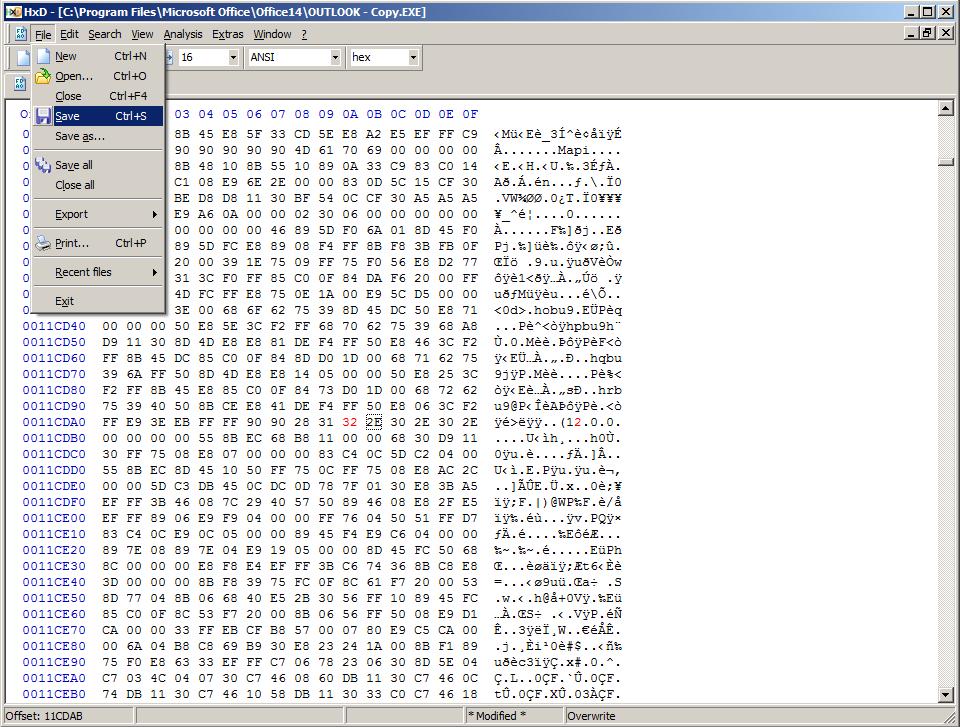
Save the change…and your done, your Google Sync should now work with 2010 Beta, because we make Outlook 2010 Beta, report to other programs it’s outlook 2007, which is a supported version.

Save the changes to the Outlook.exe


Please remember that when doing this please, read all the directions first and make sure you have a complete backup before attempting this change.